Meter readings from a photo
The meter is in a hallway or a cellar, the digits are small, the light is poor, and it has to be read every month. A photo is simpler: the app reads the digits off the picture, puts them in the field and works out how much you have used since last time. You check, you correct if needed, and the last word is always yours. Around that one photo the app keeps the rest: the tariff, what the month cost, a reminder for the reading day, and the picture itself as proof.
Author: Oleksii Itseksonthe developer of FinLad, and its user since 2025
Published: Updated:
How it works
- 1
Open More, then Utility payments, and on the home card tap Read a meter. If you have several meters there is no need to pick the service first: the app works out which meter it is from the picture and asks only if it cannot tell. Inside a service the same button is called Photograph the meter.
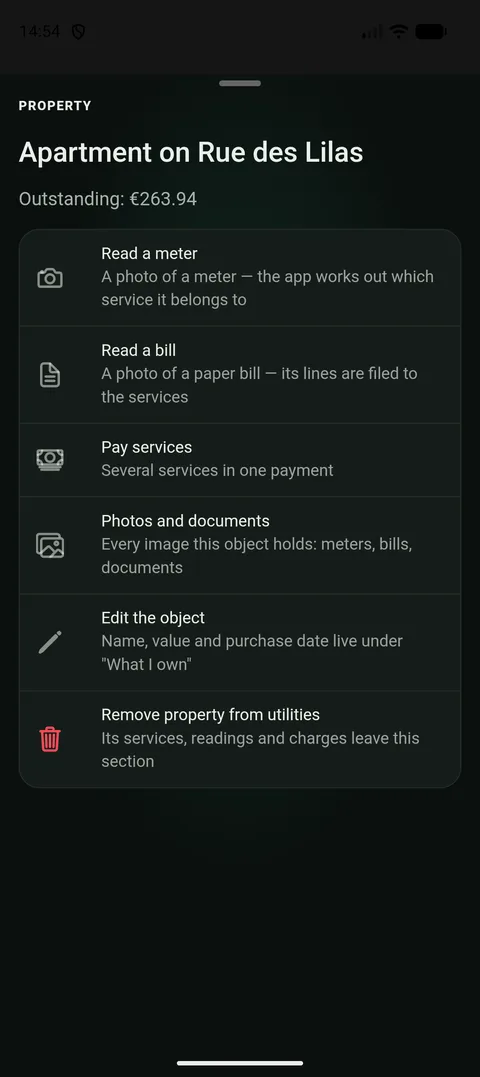
One button for the whole home: which service it is, the app works out from the picture. - 2
Photograph the dial so the digits are large and sharp. Light it with the phone if it is dark, and shoot straight on rather than from the side, because digits on a drum run together at an angle. You can also pick a photo you took earlier from your gallery.
- 3
See what was filled in. The digits appear in the reading field and the date is set to today. If you photographed yesterday’s reading, just change the date. One tap on Undo puts the field back as it was.
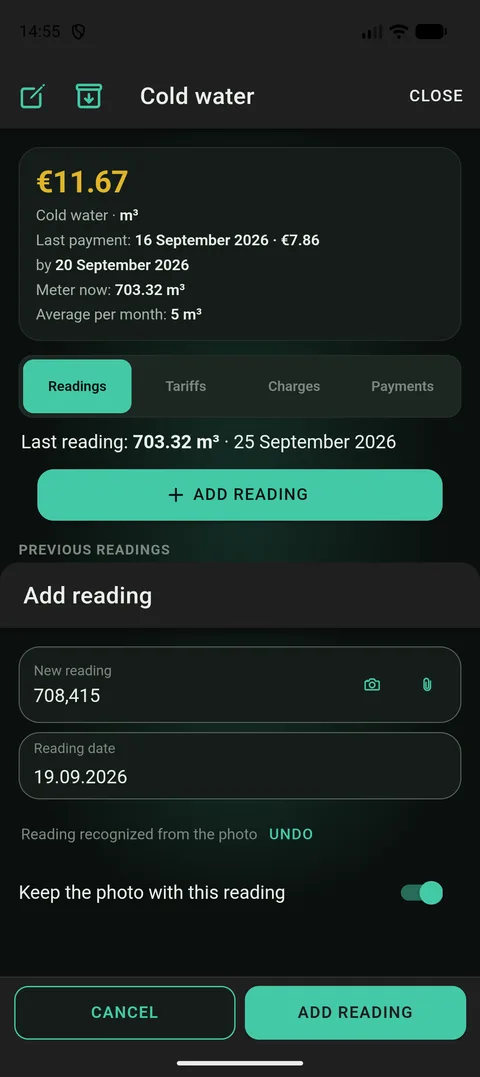
The digits land in the ordinary field. Nothing is saved until you tap Submit reading. - 4
Tap Submit reading. The app works out how much has been used since the previous reading and shows it beside the new one. If a tariff is entered, the charge for what was used appears right away. Nothing else to do.
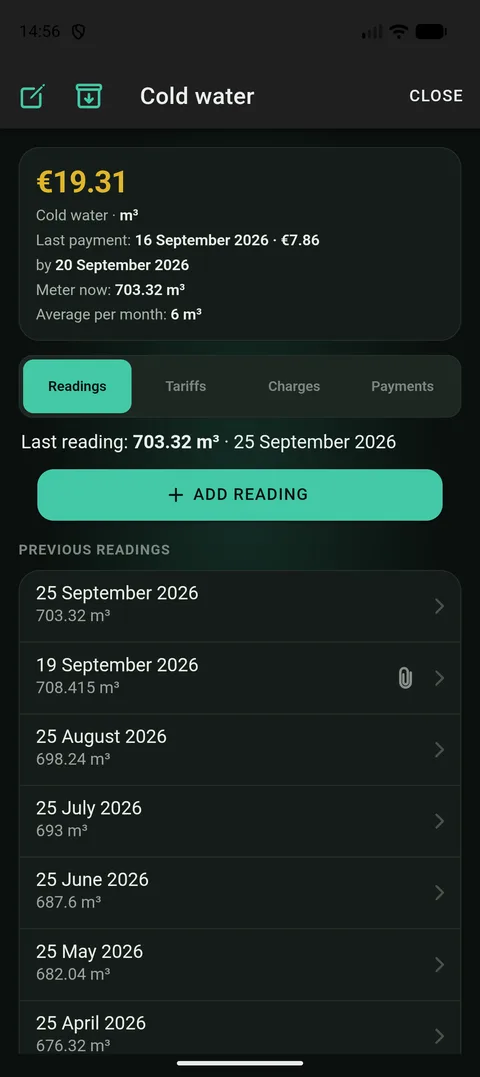
Beside the new reading you can see how much was used since the last one. 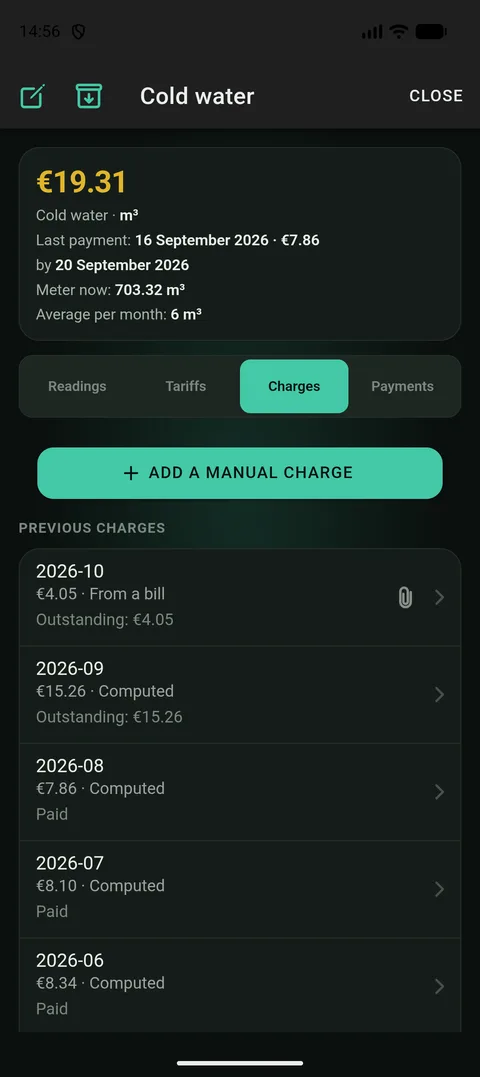
With a tariff entered, the charge is worked out for you. No arithmetic on paper. - 5
The photo stays with the reading if you want it to. The app offers that immediately, in one tap: in an argument with the provider, a dated picture of the dial is evidence.
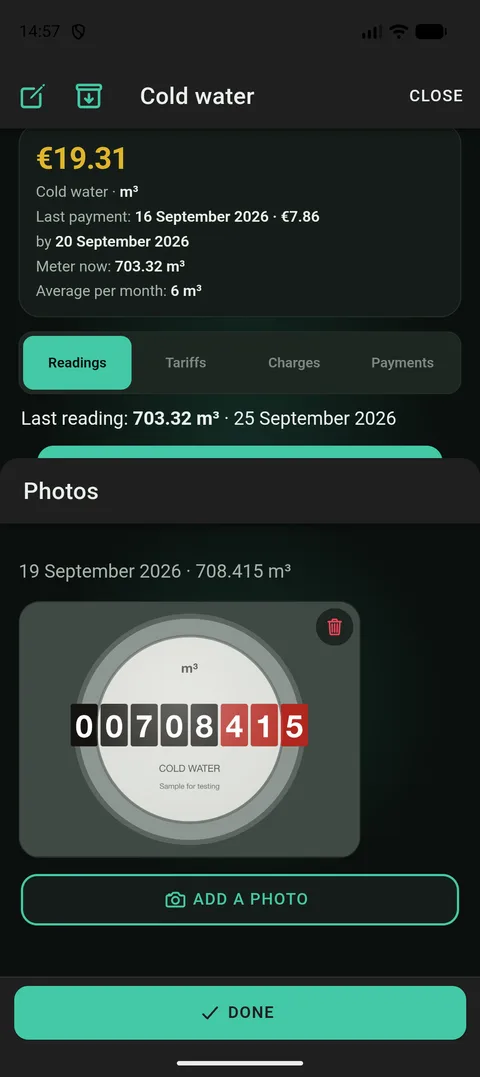
A dated picture of the dial is what you point to if the provider counts differently.
Why a photo
A meter is almost never somewhere convenient. It is above head height in a hallway, in a cellar, behind a little door you need the phone’s torch for. Getting the digits back to where you can type them means either carrying a scrap of paper or remembering six figures on the way to the other room.
A photo removes that step: you snap what you can see and the app works it out. And it is better at that than you might expect. It reads the reading itself, not the serial number or the year of manufacture printed right beside it, which are easy to mistake for it. It also notices what kind of meter it is, water, gas, electricity or heat, and uses that to find the right service.
The important part is that nothing is saved on your behalf. The digits are only filled into a field you can see. Whether to keep them or correct them is yours to decide.
When the app is unsure, it says so
- The decimal point is in the wrong place. A meter only counts forwards, so if the figure read is suddenly ten times bigger or smaller than the last one, and moving the point by one digit puts it back where it belongs, the app corrects it and shows you both numbers. One tap undoes that.
- Lower than last time. That does not happen: meters do not run backwards. The app warns and asks: was the meter replaced? If it was, say so, and the count starts afresh from the new meter.
- Far too much. If it is noticeably above what you usually use, the app says so too. Sometimes that is simply true: heating in winter, watering in summer. Then you confirm and move on.
- It looks like a different meter. If the picture is of a gas meter and you opened a water service, the app says so instead of quietly recording it.
- The digits are hard to make out. Dirty glass, deep shadow. The app fills in what it could read and asks you to check it against the meter. If nothing could be read, you type the digits in yourself: same field, nothing is blocked.
How much was used, and what it costs
A reading on its own says little: it is a number on a dial. What matters is how much has run up since last time, and the app works that out and shows it beside the reading, with the number of days it took.
If you have entered a tariff once, what a cubic metre or a kilowatt-hour costs, the charge appears along with the reading, by itself. Save a reading and the gap it closes is priced and written as a charge. Correct the reading later and the charge is recalculated, not doubled. Tariffs are kept with their dates, so when the price rises mid-month the app charges each part of the month at the price in force then, rather than the whole month at the new one.
The provider’s bill may still say something else: a standing charge, a subsidy, a reading it had not received. The app keeps both figures and shows the difference. What you owe is what the provider printed. The meter figure is there so you can see why.
One more thing about averages: the app does not say «per month on average» until the readings actually span a month. Counting eight days and multiplying by four is not an average, it is a guess. Better to say plainly how much was used and over how many days.
The reading day, and readings you already have
Give a service a reading day, the day of the month the provider wants the figure by, and the app reminds you before it. One reminder per home, not one per meter, and it goes quiet as soon as the reading is recorded.
When you set a service up, you can enter the meter’s current figure as the initial reading, so the first month is counted from the right place rather than from zero.
Years of readings kept in a spreadsheet do not have to be retyped. Import readings from a CSV or XLSX file with the home, the service, the date and the value. The app matches each row to your services by name and shows what it found before writing anything. Import the same file twice and nothing doubles: a reading already there is skipped or replaced, your choice, row by row. The same plausibility checks run on imported rows as on typed ones.
About the photos
A picture of the meter is not decoration. If the provider charges for more than you submitted, a dated picture of the dial is what you can point to. That is why the app offers to keep it with the reading rather than throwing it away after reading it.
The pictures are stored encrypted, and the key never leaves your devices. Neither we nor anybody with access to the server can open them. To be read, though, the photo does go through our server to an AI service (Google Gemini, or Anthropic if it is unavailable). The pictures are not used to train the models, and recognition can be switched off in settings.
Every photo a home holds, meters, bills and the home itself, is listed in one place, «Photos and documents», in date order and with what it is. Each can be opened full-screen or saved as a file. And if a photo is only wanted as evidence, with nothing to read off it, attach it without recognition. That is a separate button beside the first.
Which plan you need
Reading a meter from a photo is part of Plus, and there is a monthly allowance of recognitions. Without it readings are typed in by hand, and a picture of the meter can still be attached. It is stored just the same.
Worth knowing
- The reading’s date is today’s, and you can change it: a photo taken today may be of yesterday’s reading.
- A wrong reading can be corrected or deleted. The charge worked out from it is recalculated rather than duplicated.
- Recognition can be switched off entirely in settings. Readings are then typed by hand and everything else works as before.
- With no connection the digits are read on the device itself, less well, but read. The app says it managed without the network and asks you to check.
- When the month’s recognition allowance is used up, the app says so and you type the reading in. Nothing else changes.